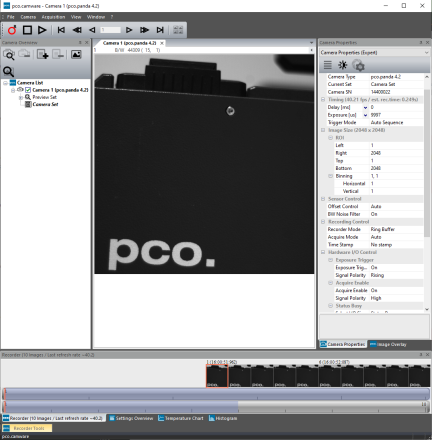
PCO Camera Control Software
The Excelitas PCO Camera Control Software is the first step to begin working with your PCO cameras. It is easy to use and provides a variety of camera and image acquisition settings, perfectly geared to help you achieve the desired results. We leverage our technical expertise and knowledge of our customers' areas of work and research to ensure your workflows are as seamless and convenient as possible..
Get started and work with your PCO cameras today by clicking the Software tab below. If you are on a Windows platform, download the pco.camware software via the link provided. For additional information and guidance through the first steps, please be sure to view our video tutorials available below in the Related Content section.
If you are on a Linux platform, be sure to visit us again as we are working on a camera control software application that will be launched soon.
Feel free to contact us if you need further assistance.
Close
Close
Subscribe Now!
Floating Web Forms block
Join the PCO Circular newsletter for early access to insights on our high‑performance imaging cameras. Receive the latest application notes, expert webinars, technical articles, educational videos, product innovations, and industry events designed for scientific, microscopy, research, and industrial imaging applications.
Floating Web Forms block

Subscribe Now!
Related Content
Application Note: pco.camware X-Cite Integration
Click below to download your free copy of the file.
pco.camware Video Tutorial 1 - User Interfaces
NOTE: If you have disabled our marketing cookies, you will not be able to access our videos or downloads. To update your cookie preferences, please click here to review and enable cookies.
Video not available due to access restriction to YouTube videos.
pco.camware Video Tutorial 2 - Customization of Camware
NOTE: If you have disabled our marketing cookies, you will not be able to access our videos or downloads. To update your cookie preferences, please click here to review and enable cookies.
Video not available due to access restriction to YouTube videos.
pco.camware Video Tutorial 3 - Setting Camera Parameters
NOTE: If you have disabled our marketing cookies, you will not be able to access our videos or downloads. To update your cookie preferences, please click here to review and enable cookies.
Video not available due to access restriction to YouTube videos.
pco.camware Video Tutorial 4 - Reloadable Camera Sets
NOTE: If you have disabled our marketing cookies, you will not be able to access our videos or downloads. To update your cookie preferences, please click here to review and enable cookies.
Video not available due to access restriction to YouTube videos.
pco.camware Video Tutorial 5 - Recording vs Preview Function
NOTE: If you have disabled our marketing cookies, you will not be able to access our videos or downloads. To update your cookie preferences, please click here to review and enable cookies.
Video not available due to access restriction to YouTube videos.
pco.camware Video Tutorial 6 - View Window and Context Menu
NOTE: If you have disabled our marketing cookies, you will not be able to access our videos or downloads. To update your cookie preferences, please click here to review and enable cookies.
Video not available due to access restriction to YouTube videos.
pco.camware Video Tutorial 7 - Convert Control Dialog
NOTE: If you have disabled our marketing cookies, you will not be able to access our videos or downloads. To update your cookie preferences, please click here to review and enable cookies.
Video not available due to access restriction to YouTube videos.
pco.camware Video Tutorial 8 - Image Overlay
NOTE: If you have disabled our marketing cookies, you will not be able to access our videos or downloads. To update your cookie preferences, please click here to review and enable cookies.
Video not available due to access restriction to YouTube videos.
pco.camware Video Tutorial 9 - Recorder Bar and Recorder Tools
NOTE: If you have disabled our marketing cookies, you will not be able to access our videos or downloads. To update your cookie preferences, please click here to review and enable cookies.
Video not available due to access restriction to YouTube videos.
pco.camware Video Tutorial 10 - Saving and Exporting Files
NOTE: If you have disabled our marketing cookies, you will not be able to access our videos or downloads. To update your cookie preferences, please click here to review and enable cookies.
Video not available due to access restriction to YouTube videos.
pco.camware Video Tutorial 11 - Switching Shutter Modes
NOTE: If you have disabled our marketing cookies, you will not be able to access our videos or downloads. To update your cookie preferences, please click here to review and enable cookies.
Video not available due to access restriction to YouTube videos.
pco.camware Video Tutorial 12 - Lens Control for Canon EF Lenses
NOTE: If you have disabled our marketing cookies, you will not be able to access our videos or downloads. To update your cookie preferences, please click here to review and enable cookies.
Video not available due to access restriction to YouTube videos.
pco.camware Video Tutorial 13 - Math Tools
NOTE: If you have disabled our marketing cookies, you will not be able to access our videos or downloads. To update your cookie preferences, please click here to review and enable cookies.
Video not available due to access restriction to YouTube videos.
pco.camware Video Tutorial 14 - Saving Single Images During Recording
NOTE: If you have disabled our marketing cookies, you will not be able to access our videos or downloads. To update your cookie preferences, please click here to review and enable cookies.
Video not available due to access restriction to YouTube videos.
pco.camware Video Tutorial 15 - Recording Directly to File
NOTE: If you have disabled our marketing cookies, you will not be able to access our videos or downloads. To update your cookie preferences, please click here to review and enable cookies.
Video not available due to access restriction to YouTube videos.
pco.camware Video Tutorial 16 - Auto RAM Segment Switching
NOTE: If you have disabled our marketing cookies, you will not be able to access our videos or downloads. To update your cookie preferences, please click here to review and enable cookies.
Video not available due to access restriction to YouTube videos.
pco.camware Video Tutorial 17 - Trigger Operation and Configuration
NOTE: If you have disabled our marketing cookies, you will not be able to access our videos or downloads. To update your cookie preferences, please click here to review and enable cookies.
Video not available due to access restriction to YouTube videos.
pco.camware Video Tutorial 18 - Common Mode
NOTE: If you have disabled our marketing cookies, you will not be able to access our videos or downloads. To update your cookie preferences, please click here to review and enable cookies.
Video not available due to access restriction to YouTube videos.
pco.camware Video Tutorial 19 - Lookup Tables
NOTE: If you have disabled our marketing cookies, you will not be able to access our videos or downloads. To update your cookie preferences, please click here to review and enable cookies.
Video not available due to access restriction to YouTube videos.
pco.camware Video Tutorial 20 - Demo Mode
NOTE: If you have disabled our marketing cookies, you will not be able to access our videos or downloads. To update your cookie preferences, please click here to review and enable cookies.
Video not available due to access restriction to YouTube videos.
pco.camware Video Tutorial 21 - Logging
NOTE: If you have disabled our marketing cookies, you will not be able to access our videos or downloads. To update your cookie preferences, please click here to review and enable cookies.
Video not available due to access restriction to YouTube videos.
pco.camware Video Tutorial 22 - Hidden Features
NOTE: If you have disabled our marketing cookies, you will not be able to access our videos or downloads. To update your cookie preferences, please click here to review and enable cookies.
Video not available due to access restriction to YouTube videos.
pco.camware Video Tutorial 23 - Color Coded Image Overlay
NOTE: If you have disabled our marketing cookies, you will not be able to access our videos or downloads. To update your cookie preferences, please click here to review and enable cookies.
Video not available due to access restriction to YouTube videos.